hey! do you guys have magic cards?
if so, do you have any battle for baldurs gate packs? thanks!
We do sell Magic the Gathering, but we do not have any Baldur’s Gate packs. Sorry.
Do you guys have the Suicide Squad: Kill the Arkham Asylum comics?
Yes, we have the first two issues in. If you let us know which issues you want, and which store you want to pick them up at, we can set them aside for you; you can also call us at 717-591-2727 for the Mechanicsburg store or 717-767-4871 for the York store.
Do you guys have any of the Life is Strange comics?
We have issue #2, which came in on Wednesday. Would you like us to hold it for you?
Do you have radiant pink #3?
We do not have Radiant Pink #3. Sorry.

The York Store will open at 11am as usual. Drive safe!
Do you have any plushies or pins from the Tea Dragon Society still in stock?
We have one Jasmine plush and two Rooibos plushies, both of which are $30. For pins, we have two Alpine pin sets ($20), and a few Aquicorn cove sets ($10).
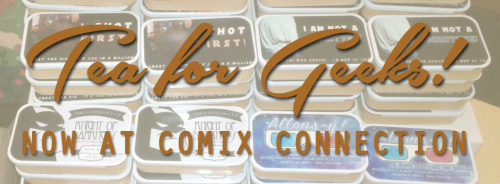
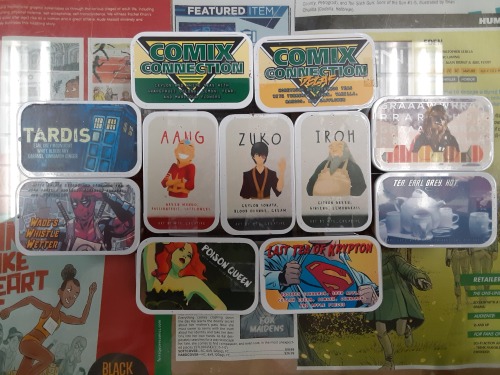
Aang Tea: green tea with hibiscus, rose hips, cinnamon, lemongrass, mango, raspberry, passionfruit, peach, marigold, and rose petals (low caffeine)
Iroh Tea: green tea with lemongrass, ginger, citron, orange, and marigold - as befits the best tea shoppe in Ba Sing Se! (moderate caffeine)
Zuko Tea: black tea with rose hips, orange, hibiscus, creme, and ceylong sonata (moderate caffeine)
Poison Queen Tea: green tea with vanilla, orange, cinnamon, white monkey, and ginger (moderate caffeine)
Chewbacca (gRaaawwRRarRRarghhhh) tea: black tea with coconut, orange, hazelnut…and sprinkles! (high caffeine)
Last Tea of Krypton: a tea as American as apple pie! A blend of black tea and rooibos caramel with apple pieces, rose hips, ginger, hibiscus, cinnamon, and creme (low caffeine)
Wade’s Whistle Wetter: a blend of black, green, and roobois teas with cinnamon, vanilla, cloves, mandarin, marigold flowers…and SPRINKLES! (high caffeine)
Picard’s Earl Grey, Hot: black tea with bergamot, orange peels, almond, blue cornflowers, vanilla, and anise (high caffeine)
TARDIS: black and white tea blend of earl grey, white blueberry, caramel, cream, orange peel, vanilla, and blue cornflowers (high caffeine)
Original: lemon soleil black tea, white pear tea, and grapefruit oolong tea accented with marigold flowers, orange, and apple pieces (high caffeine)
Caffeine-Free: honeybush vanilla, rooibos lemon, and tumeric with cinnamon, rose hips, mango and apple pieces, ginger, lemongrass, orange, safflower, and marigold flowers (no caffeine!)